Supplier SDS Data Extraction & Validation
Turn supplier Safety Data Sheets into structured regulatory data.
Upload inbound supplier SDSs and get structured, reviewable data — identifiers, composition, classification, properties and transport — with provenance and validation at every step.
Inbound SDSs are unstructured and slow to process
The problem
Every supplier SDS arrives in a different layout, language and level of completeness. Re-keying that data into your systems is slow, error-prone and hard to audit.
- Manual transcription of composition and classification
- No consistent record of where a value came from
- Backlogs when supplier documents change
The approach
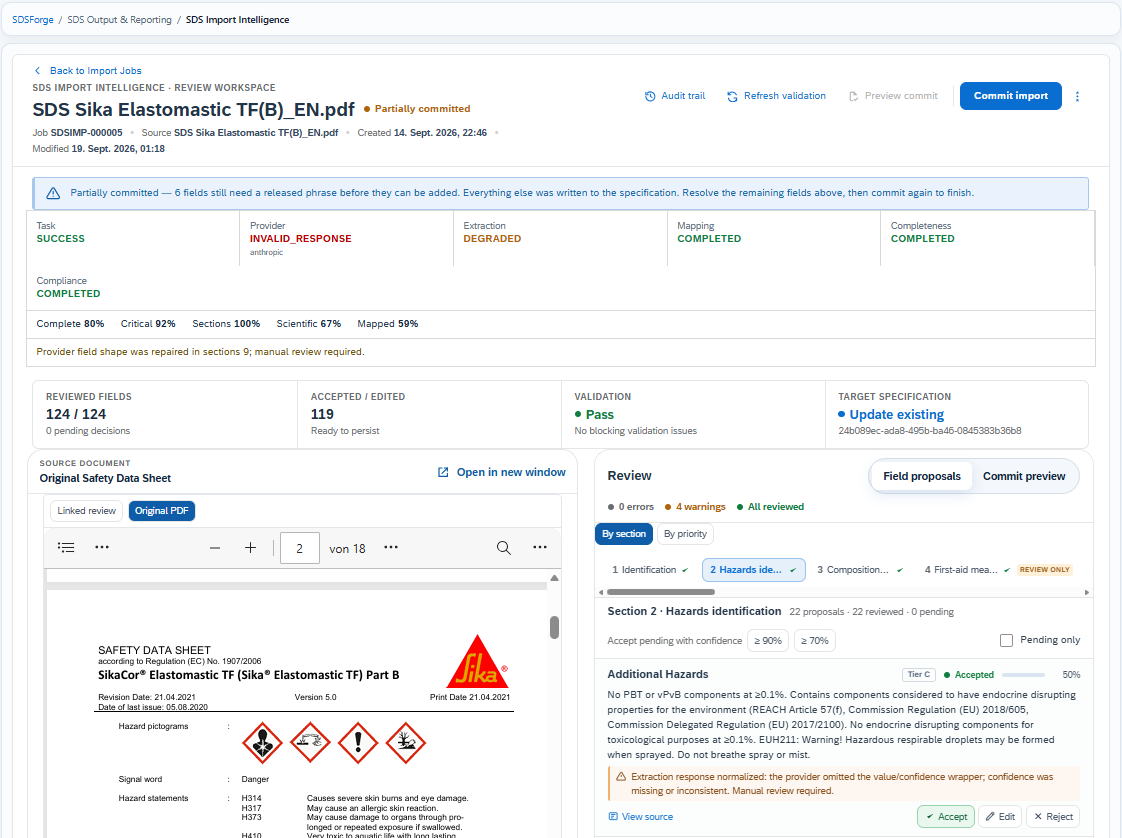
SDS Import Intelligence is SDS data extraction software that analyses the document, extracts regulated data points into a structured model, runs validation checks, and presents everything for human review with a link back to the source passage.
- Structured output aligned to your specification model
- Provenance: every value traces to the source text
- Validation flags gaps, conflicts and implausible values
Extraction categories
- IdentifiersProduct name, supplier, CAS/EC numbers, revision data.
- CompositionComponents, concentration ranges and impurities as declared.
- ClassificationHazard classes, categories, H-statements and labelling.
- Physicochemical propertiesSection 9 property values with units.
- ToxicologySection 11 endpoint data and study references where present.
- EcotoxicologySection 12 aquatic toxicity and degradation data.
- TransportUN number, class, packing group and proper shipping name.
- Regulatory informationSection 15 references and jurisdiction-specific notes.
Upload to specification
Upload
Add one or many supplier SDS files.
Analyse
Document structure and language detected.
Extract
Regulated data points captured with provenance.
Validate
Automated checks for gaps and conflicts.
Review
Human confirmation of each field.
Create
Structured specification generated.
What to expect
- Input
- PDF supplier SDS
- Languages
- Multiple, auto-detected
- Output
- Structured specification data
- Provenance
- Source-linked values
- Review
- Mandatory human step
- Integration
- Feeds SDSFORGE
Scope note: Extraction is assistive, not autonomous. CHEMREG does not claim 100% extraction accuracy — every field is presented for human validation before it becomes a record.
Frequently asked
Is the extraction fully automatic?
No. The system proposes structured values; a reviewer confirms or corrects each one before it is saved.
What happens to low-confidence fields?
They are flagged and cannot be accepted without explicit review. Conflicts between sections are surfaced too.
Does it work with scanned SDSs?
Text-based PDFs give the best results. Image-only scans depend on OCR quality and may need more review.
What is SDS data extraction software?
SDS data extraction software reads supplier Safety Data Sheets and pulls regulated data — composition, classification, properties, transport information — into a structured, reviewable record instead of manual re-keying, with each value traceable to its source passage.
Can it extract data from non-English supplier SDS documents?
Yes — document language is auto-detected, and extracted data is normalised into your structured specification model regardless of the source language, subject to the same human review step.
See SDS Import Intelligence with your own data
Book a working session with a CHEMREG regulatory specialist. Tell us about your portfolio and markets and we'll tailor the walkthrough.